

MOBILE APP AND MATCHMAKING
Start planning your time at Medtrade 2026. Login now, get organized, then carry your schedule in your pocket!
Scroll down to see helpful information for both attendee and exhibitor app users.
Mobile App Features & Benefits
- Find the right exhibitors with AI-powered in-app matchmaking
- Connect with other app users, request meetings, and send messages
- Explore exhibitors, products, show specials, and more
- Get real-time show updates and view networking events*
- Built-in Lead Capture (for exhibitors only) to grow your leads and boost your ROI. Available to every exhibitor staff member.
Lead Capture Features & Benefits (for exhibitors only)
- Quickly scan attendee badges from the Mobile App to instantly capture contact information
- Multiple users at no added cost
- Scan offline. Scan anywhere. The leads will sync when you have internet connection again
- Export all of your Team’s leads
For more information exporting your team’s leads, click here.
Mobile App requires at least IOS 16 or Android 9 to operate on mobile devices.
*In-app notifications must be enabled to receive real-time updates. To do so, go to your phone system settings.
Access the Medtrade Mobile App Now!
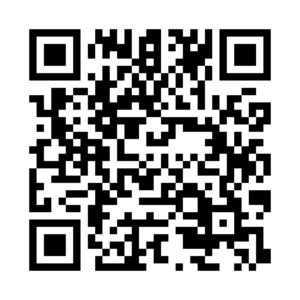
Scan the QR code to Download
Or search Medtrade in the App Store. Click here to download it on a mobile device.
User Login
Login using the email address you provided when you registered for Medtrade and enter the Registration Confirmation # / ID number as your password. Registration Confirmation # / ID can be located in your registration confirmation email. You will be prompted to create a new password after successfully entering your email and Registration Confirmation # / ID.
If you have used the Medtrade Mobile App before and are registered for the upcoming show, use the login credentials you previously created.
ATTENDEES
Access your login credentials (registration ID and email address) from your registration confirmation email, or if you are on-site you will find your registration ID (a 4 or 5 digit number) on your badge, below the QR code. Plan your itinerary, review educational sessions, and network with peers and exhibitors!
Helpful guides and videos:
Note for Conference attendees: session handouts, if provided by the speaker, can be found by locating the session in the app (Show Schedule), and then scrolling down beneath the list of session speakers. If the handout is available it will be shown under Session Content.
Still need help? Please email the Support Team.
EXHIBITORS
Access your login credentials (registration ID and email address) from your badge confirmation email (you must register for your badge prior to using the app). Update your individual and company profiles, plan your schedule, and start connecting!
Helpful guides and videos:
Email the Support Team if you have any questions. If you are experiencing issues with the lead scanning portion of the app, please review the FAQ, or you may visit the support desk located near the registration desks.